

vivre-motion
TIME PULSE for Windows | Stream Deck Plugin
SKU: VM-70064- Regular price
- € 0,00 EUR
- Regular price
-
€ 19,00 EUR - Sale price
- € 0,00 EUR
- Unit price
- per
Couldn't load pickup availability
 Download ➔ Elgato Market Place
Next Level Time Tracking
TimePulse is a smart productivity plugin designed to automatically track time spent in active applications and windows on your computer. Instead of manually logging hours or starting timers, TimePulse seamlessly detects what you are actually working on — helping you understand how your workday is truly spent without interrupting your workflow.
Using periodic activity snapshots, TimePulse identifies the currently focused window and records time only when an application remains active long enough to represent real work. This approach creates a realistic and practical overview of your daily activity while avoiding intrusive continuous monitoring.
TimePulse offers two tracking methods based on different snapshot intervals. The One-Minute Snapshot mode checks the active window every 60 seconds and counts time only when the same application remains in focus across consecutive checks. The Five-Seconds Snapshot mode performs more frequent checks every 5 seconds, allowing faster recognition of activity changes while still awarding time in full-minute increments once sufficient activity has been observed. This gives users the flexibility to choose between minimal system activity or more responsive tracking precision.
At the end of the day, you receive a clear, structured breakdown showing how many minutes were spent across applications, tasks, and projects. This makes TimePulse especially valuable for freelancers, developers, designers, consultants, and teams who need to report working hours back into ERP (SAP, Oracle, Dynamics 365, Infor), billing, or project management systems.
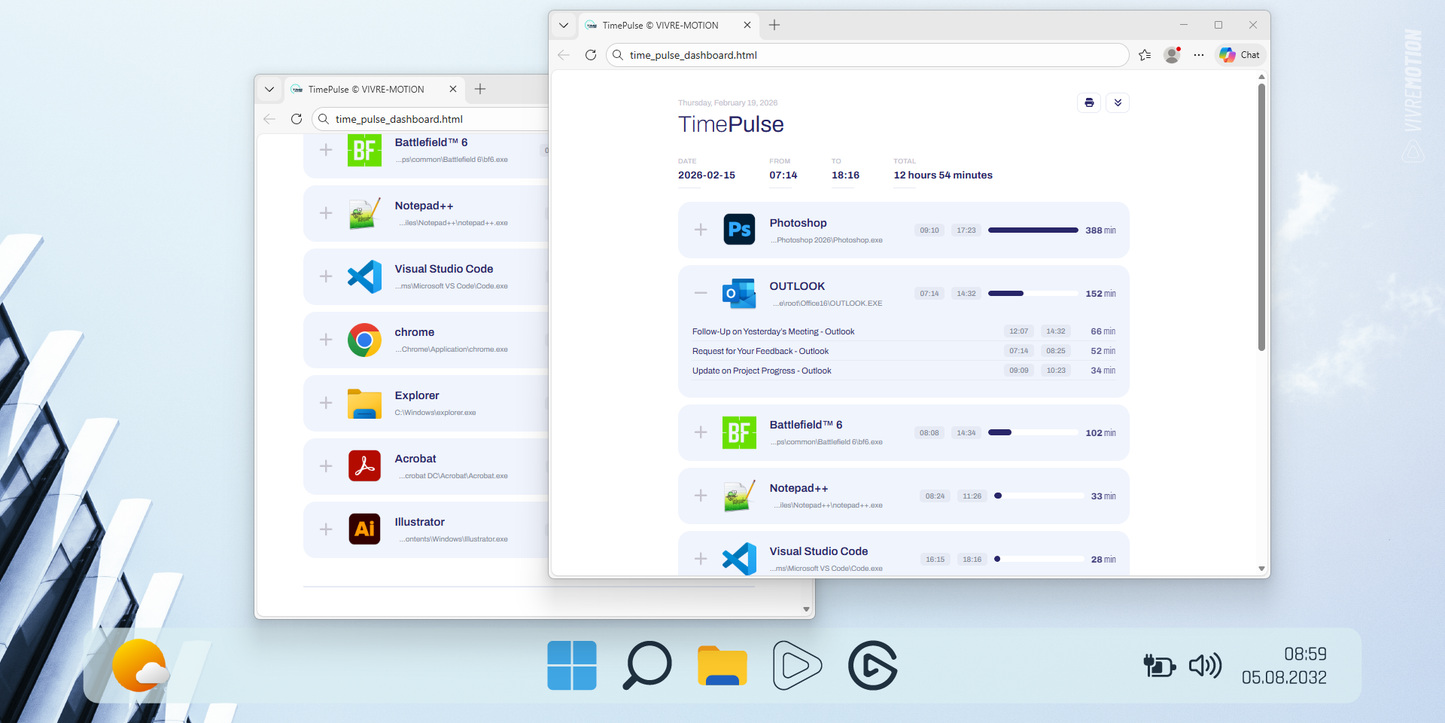
All activity data can be exported as CSV files, enabling easy integration into existing workflows and reporting tools. The integrated web dashboard provides transparent visualizations, intelligently clustering applications so you instantly see where your time went.
TimePulse focuses on lightweight, privacy-conscious tracking by capturing periodic snapshots rather than performing constant surveillance. The result is efficient performance, minimal system impact, and a strong emphasis on personal productivity and self-organization.
Whether you want better daily awareness, accurate project reporting, or improved focus management, TimePulse turns your computer activity into meaningful, actionable insights.
Features
- Automatic App Tracking
- One-Minute Snapshot
- Five-Seconds Snapshot
- Smart Web Dashboard
- Project Time Overview
- White-/Black-List
- CSV Export
- Daily Session Logging
- Window Title Tracking
This application does not perform continuous real-time tracking of user activity. Instead, it captures periodic snapshots of the currently active window at defined time intervals. As a result, the recorded data represents only point-in-time approximations of actual usage. Due to these methodological limitations, the analytics, statistics, and time measurements generated by this application are not scientifically validated measurements and are not suitable for scientific research, empirical studies, or precise behavioral analysis. All provided data is intended solely for personal productivity tracking, self-organization, and general informational purposes. No guarantee is made regarding the completeness, accuracy, or scientific validity of the collected information.
 Code Signed
Share